

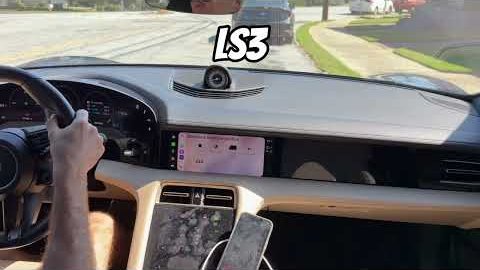
Porsche 911 GT3
Flat 6
DriveTone is an iPhone engine sound simulator for EVs and gas cars—bringing every rev, shift and rumble to your everyday drive.
Real recordings of the Porsche 911 GT3 and Lamborghini Aventador. An upcoming version also supports sound mods designed for BeamNG.drive®.
Flat 6
V12
Explore hundreds of free and paid sound mods. Bring compatible sounds into DriveTone and transform your car’s soundtrack.
Sound designers can create dynamic soundscapes from DriveTone’s real-time data—and literally drive inside their creations. Spaceships, meditative rhythms or live-generated music that reflects the driving vibe.
Engineered to be so fun and reliable you’ll want to use it every day.
Set up auto-launch to open DriveTone every time your phone connects to your car.
DriveTone works in the background and pairs perfectly with your music, podcasts or other media on your iPhone.
Continually refines calibration and recovers from small movements of the phone.
COMING SOONGPS-only tracking and diagnostic polling can trail changes in your driving. DriveTone fuses your iPhone’s motion sensors with GPS to track speed and react quickly, tuned against recorded drives and independent vehicle measurements.
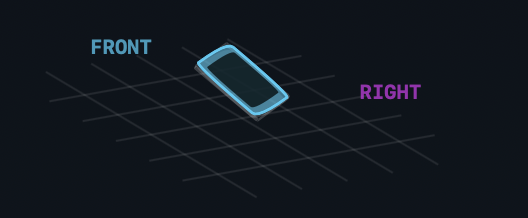
DriveTone combines motion-sensor and GPS data to track the phone’s orientation and estimate the forces acting on your car.
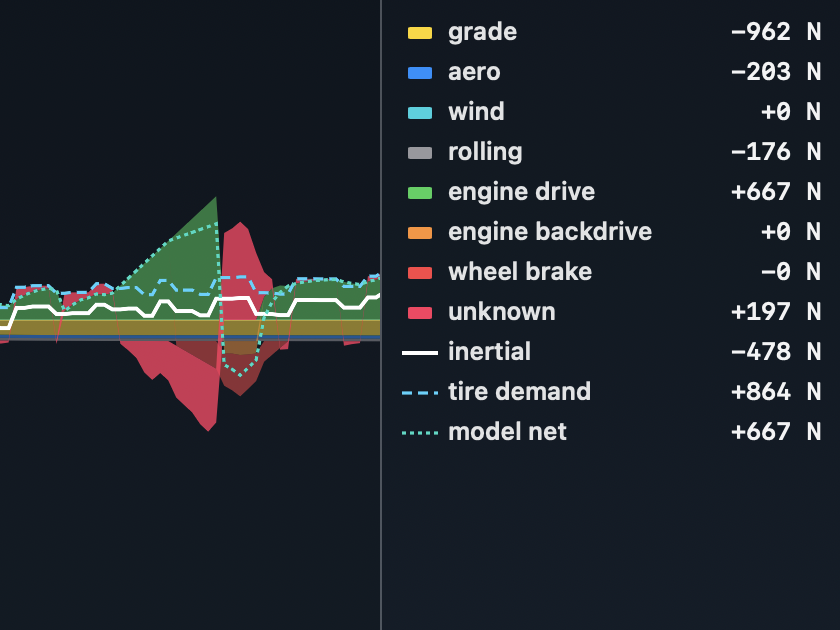
A realistic powertrain simulation follows your car’s actual motion, modelling the engine, transmission, braking and road forces acting on the virtual car.
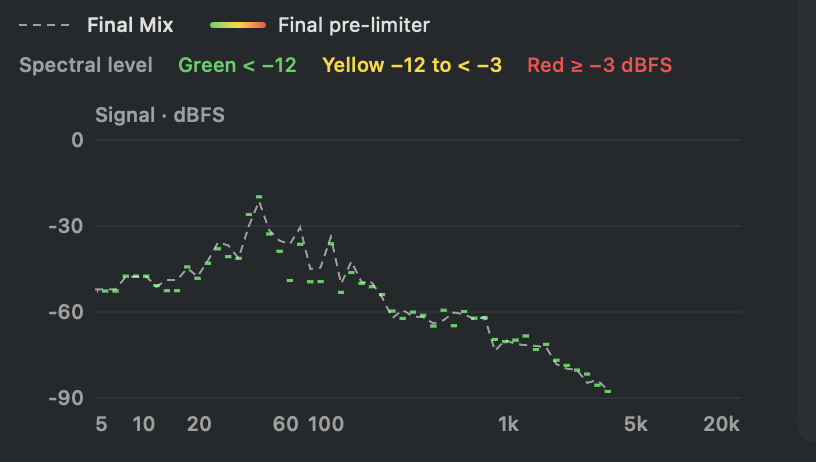
The simulated powertrain data feeds our video-game quality audio renderer. Stereo and spatial sound, together with a carefully designed haptics layer, create a soundscape you can hear and feel.
OBD adapters read speed directly from your car, but that data still has to reach your phone. In our Veepeak/Taycan tests, speed updates arrived about 140 ms behind our phone-motion reference.* DriveTone uses your iPhone’s sensors, so you can use it right now without buying additional hardware.
*From our Veepeak/Taycan tests. Results vary by car and adapter.
Yes. Some gas cars already use active sound enhancement to add engine sound inside the cabin. DriveTone brings that idea to electric and gas cars, with simulated gears and a choice of engine sounds that respond to your driving through your car’s speakers.
You need an iPhone, a place where it won’t slide or move—such as a secure mount or non-slip pad—and an audio connection to your car’s speakers through CarPlay, Bluetooth or aux. No OBD adapter is required.
Yes. DriveTone uses your iPhone’s motion sensors and GPS to drive a virtual engine and gearbox, producing engine sounds that respond to your driving through your car’s speakers. It works with electric and gas cars without an OBD adapter.
EVs and even some gas cars use generated engine sounds to add feedback and character to the driving experience. Read why responsive sound and virtual gears can make driving more involving.
No. DriveTone simulates its own engine RPM and gear shifts from your car’s motion. It does not read your car’s actual engine RPM or selected gear.
Yes. DriveTone works with both wired and wireless CarPlay. Wired CarPlay is our gold standard for sound quality. Wireless CarPlay can also feel responsive, though sound quality varies with the manufacturer’s audio system.
Yes. Bluetooth works, but some car audio systems add enough delay to make the sound feel less responsive. Unlike with CarPlay, which can use your car’s GPS antenna for better reception, DriveTone relies on your iPhone’s own GPS when using Bluetooth alone. Placing the phone where it gets a clear signal helps it calibrate and stay in sync with your speed. Use the free test drive to check your setup.
DriveTone includes recordings of the Porsche 911 GT3 and Lamborghini Aventador. Support for importing compatible sound mods designed for BeamNG.drive® is coming in an upcoming version.
DriveTone is free to download and includes 30 minutes of test drives in your car. An annual subscription or lifetime unlock gives you unlimited driving and access to future sound packs.
I love driving. I raced RC cars as a kid, drove go-karts as often as possible, and played racing games. To this day, I still love cars and have owned several sports cars over the years. I even get to the track every once in a while.
But I also love the practicality and sustainability of EVs (we’ve got 3). EVs are great cars, and I even love how quiet they are much of the time. But I also miss the experience of having the sound and feel of engines and gearboxes as part of the experience.
When I saw manufacturers starting to build out simulated gears and sounds into EVs, I wondered if it could really be fun, or just a gimmick. With none available to test drive nearby, I decided to build a prototype to test if a phone app could sync the sound fast enough to be believable, and whether it would be any fun. Turns out it’s a YES to both! The prototype was surprisingly fun, and I kept wanting to use it every day.
When the prototype worked, I searched for and tried every app I could find that promised something similar. After all, there’s not much point in building another copy of something when there’s already a great solution. While I found numerous apps that claim to do this, none got all three things right: quality sound, a convincing response to driving, and no OBD hardware required.
I’ve been a professional software developer for 30 years, and I use AI to help build DriveTone. But writing code has never been the whole job. A good app comes from hundreds of small decisions, testing, and iteration. For DriveTone, that’s meant hundreds of real-world drives, testing different cars and phones, refining how it responds, and finding and licensing sounds that make the experience worth coming back to.
That might seem like a lot of work for something a little frivolous. Fair enough! DriveTone is meant to put a smile on your face—whether you’re hearing an engine you’ve always loved, remembering a car you used to own, or just making your commute more entertaining.
Anything worth doing is worth doing right. If you find yourself wanting to turn DriveTone on every time you get in the car, I’ve done my job.
Over time, I want to make DriveTone the best alternative-sound platform for cars. That means more great engine sounds, room for entirely new sound experiences, and opportunities for sound creators to hear their work out on the road.
— Alan
This chart lists connections for U.S. models based on available information. Details can vary by trim and audio system.
| Model years | Wired CarPlay | Wireless CarPlay | Bluetooth | AUX port | Spatial Stereo | Notes |
|---|---|---|---|---|---|---|
| Ford Mustang Mach-E | ||||||
| 2021–2026 | No | Unknown | Both wired and wireless CarPlay worked well on a 2025 Mach-E with the Bang & Olufsen premium stereo. |
|||
| Hyundai Ioniq 5 | ||||||
| 2025–2026 | Unknown | Unknown | U.S. models. Hyundai lists wireless CarPlay and Bluetooth. |
|||
| Year unknown | Unknown | Unknown | An earlier wireless CarPlay test reported 1,400 ms. Backup audio mode hasn’t been verified on this vehicle. |
|||
| Polestar 2 | ||||||
| 2024 | Unknown | Unknown | — | |||
| Porsche Taycan | ||||||
| 2020–2024J1.1 | No | Unknown | Wired CarPlay worked well on a J1.1 Taycan. Wireless worked with the backup audio mode in DriveTone, with some change in tone. Standard media playback had substantial delay. |
|||
| 2025 | Unknown | Unknown | — | |||
| Tesla Cybertruck | ||||||
| Year unknown | Unknown | Unknown | Bluetooth media audio is supported. The current app version hasn’t been tested on this vehicle. |
|||
| Ford F-150 | ||||||
| 2025 | Unknown | Unknown | Factory SYNC 4 on gas and PowerBoost Hybrid models. |
|||
| Honda CR-V | ||||||
| 20257-inch display | Unknown | Unknown | LX, EX and Sport Hybrid. |
|||
| 20259-inch display | Unknown | Unknown | EX-L, Sport-L Hybrid and Sport Touring Hybrid. |
|||
| Honda Civic Sedan | ||||||
| 20257-inch display | Unknown | Unknown | LX, Sport and Sport Hybrid. |
|||
| 20259-inch display | Unknown | Unknown | Sport Touring Hybrid. |
|||
| Toyota Camry | ||||||
| 2025 | Unknown | Unknown | — | |||
| Toyota RAV4 | ||||||
| 2025 | Unknown | Unknown | Gas and Hybrid models. |
|||
| Volvo XC90 Recharge | ||||||
| 2021–2022Sensus | No | Unknown | See the OTTOCAST U2-AIR test below for an aftermarket wireless option. |
|||
| 2024 | Unknown | Unknown | — | |||
| Model years | Wired CarPlay | Wireless CarPlay | Bluetooth | AUX port | Spatial Stereo | Notes |
|---|---|---|---|---|---|---|
| Ford F-150 | ||||||
| 2025 | Unknown | Unknown | Factory SYNC 4 on gas and PowerBoost Hybrid models. |
|||
| Honda CR-V | ||||||
| 20257-inch display | Unknown | Unknown | LX, EX and Sport Hybrid. |
|||
| 20259-inch display | Unknown | Unknown | EX-L, Sport-L Hybrid and Sport Touring Hybrid. |
|||
| Honda Civic Sedan | ||||||
| 20257-inch display | Unknown | Unknown | LX, Sport and Sport Hybrid. |
|||
| Nissan Rogue | ||||||
| 20258-inch display | Unknown | Unknown | S, SV and Rock Creek. |
|||
| 202512.3-inch display | Unknown | Unknown | SL and Platinum. |
|||
| Subaru Crosstrek | ||||||
| 2025Dual 7-inch display | Yes | Unknown | Base trim. |
|||
| 202511.6-inch display | Yes | Unknown | Premium, Sport, Limited and Wilderness. |
|||
| Toyota RAV4 | ||||||
| 2025 | Unknown | Unknown | Gas and Hybrid models. |
|||
Confirmed wired CarPlay is rated Responsive unless testing shows otherwise. Untested means the connection is available and its responsiveness hasn’t been rated. Unknown means availability hasn’t been confirmed.
OTTOCAST U2-AIR on Volvo XC90 Recharge. Worked well.
Content creators, sound modders and composers welcome.
Introduce DriveTone to your car, EV, gaming or sound community. Talk to us about earning a share of app purchases.
Discuss an affiliate partnership ↗Send a link to your channel or community.Give your sounds another place to be heard—in a real car. Share compatible mods, or discuss licensing for our included sound library.
Sound creators can also become affiliates. No audience is needed for licensing; no licensing deal is needed for affiliates.
Discuss sound opportunities ↗Send a demo or link to your work.Need help with DriveTone or want to share feedback? Email [email protected].
To report a problem with a drive, use Send Feedback in the app. You can include a diagnostic recording to help us troubleshoot.
For help with setup, CarPlay or Bluetooth, see the Common Q&A.
BeamNG.drive® is a registered trademark of BeamNG GmbH. DriveTone is not affiliated with or endorsed by BeamNG GmbH.
Vehicle names identify the sources of the sound recordings. All trademarks belong to their respective owners. This app is not affiliated with or endorsed by the vehicle manufacturers.
Apple, the Apple logo, iPhone and CarPlay are trademarks of Apple Inc., registered in the U.S. and other countries. App Store is a service mark of Apple Inc.